Pick a workout.
Eight categories, from fartlek to track to long runs. Goal race set? The ones that matter float to the top.

Structured running workouts, built from your fitness and tuned to how you feel today.
Scroll
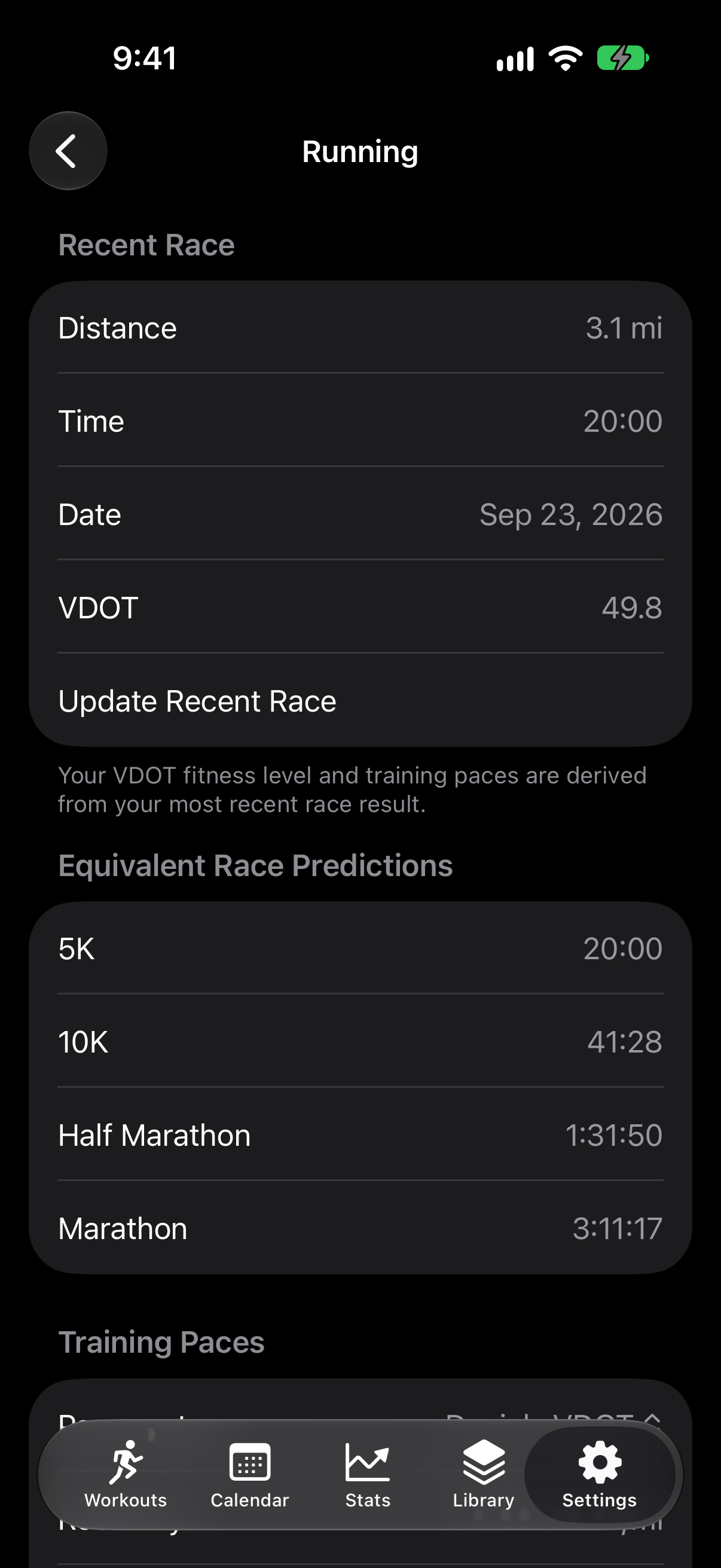
Tell it a recent race. It works out your VDOT, derives your pace zones, and writes the session. Intervals, tempos, hills and long runs, sized to the mileage you want.
How it works
Eight categories, from fartlek to track to long runs. Goal race set? The ones that matter float to the top.
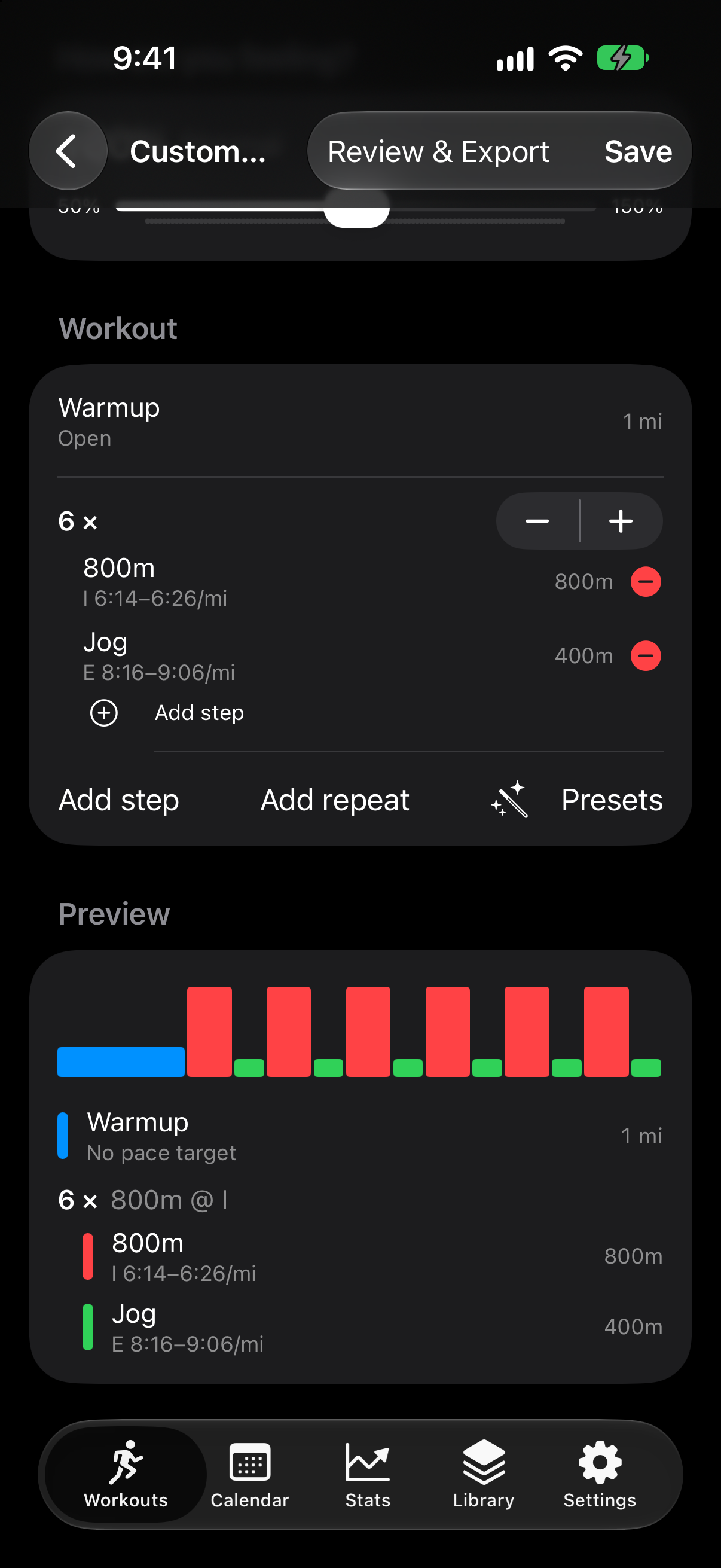
Slide the mileage. Slide the intensity from 50% to 150%. Every pace follows how you feel today.
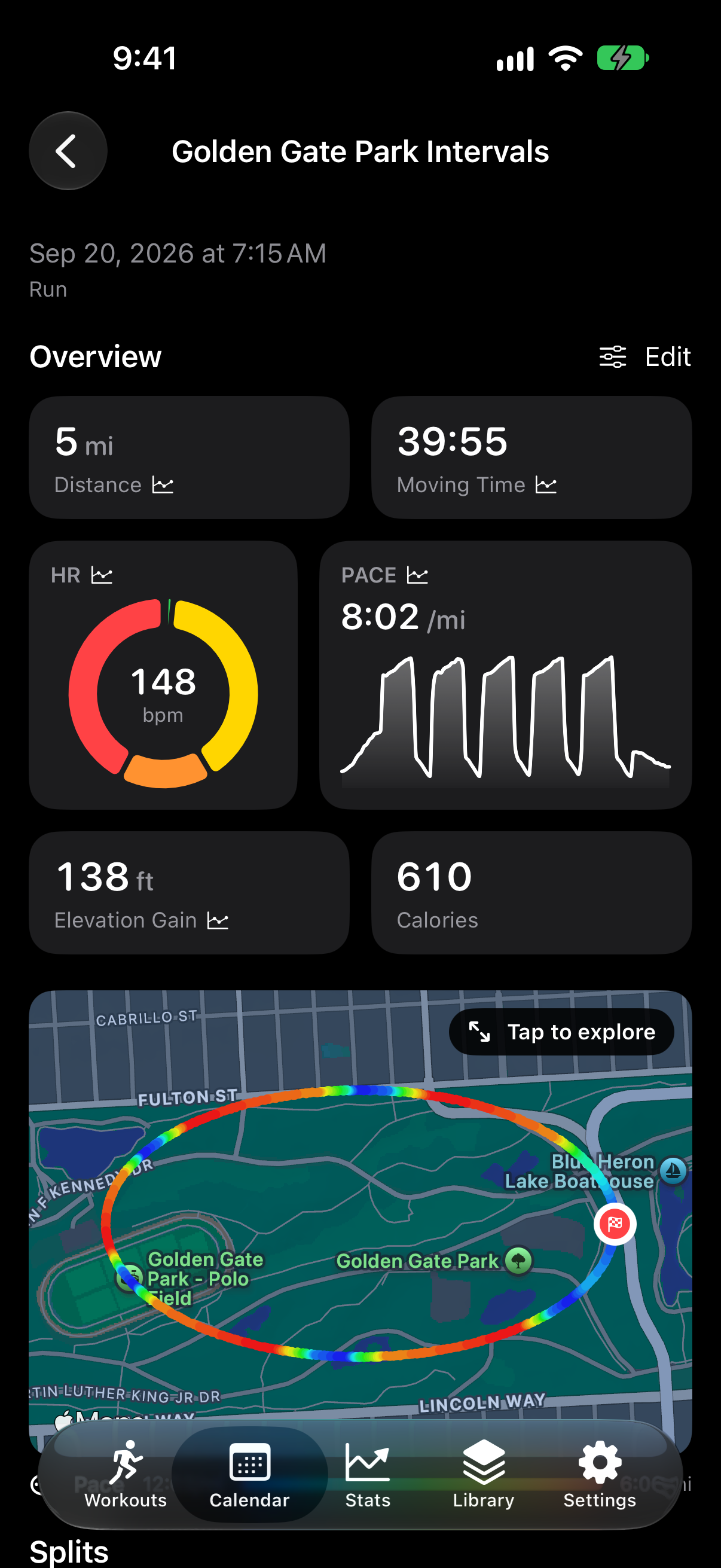
A block-by-block timeline with pace targets, distance and duration for every step.
Set your race, goal and training system once. Everything regenerates around it.
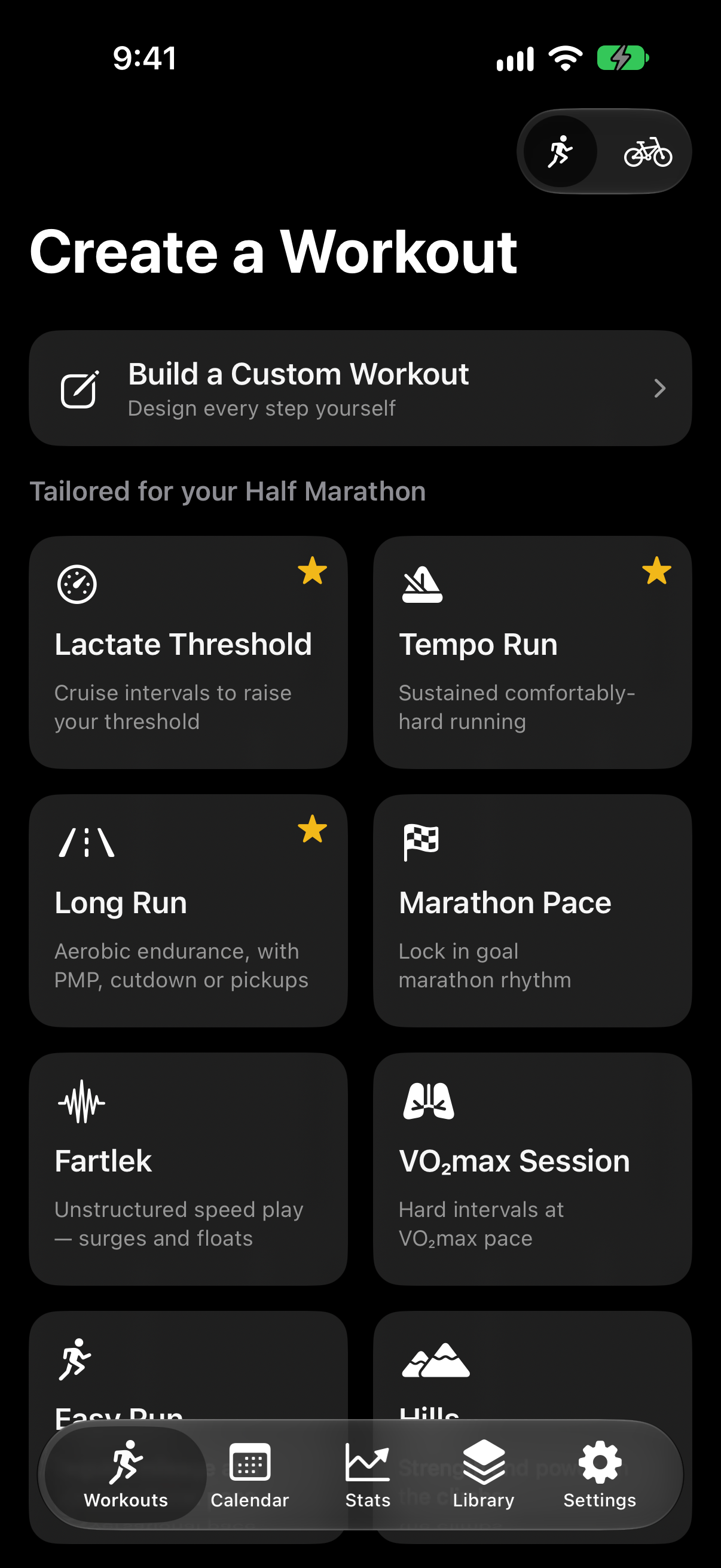
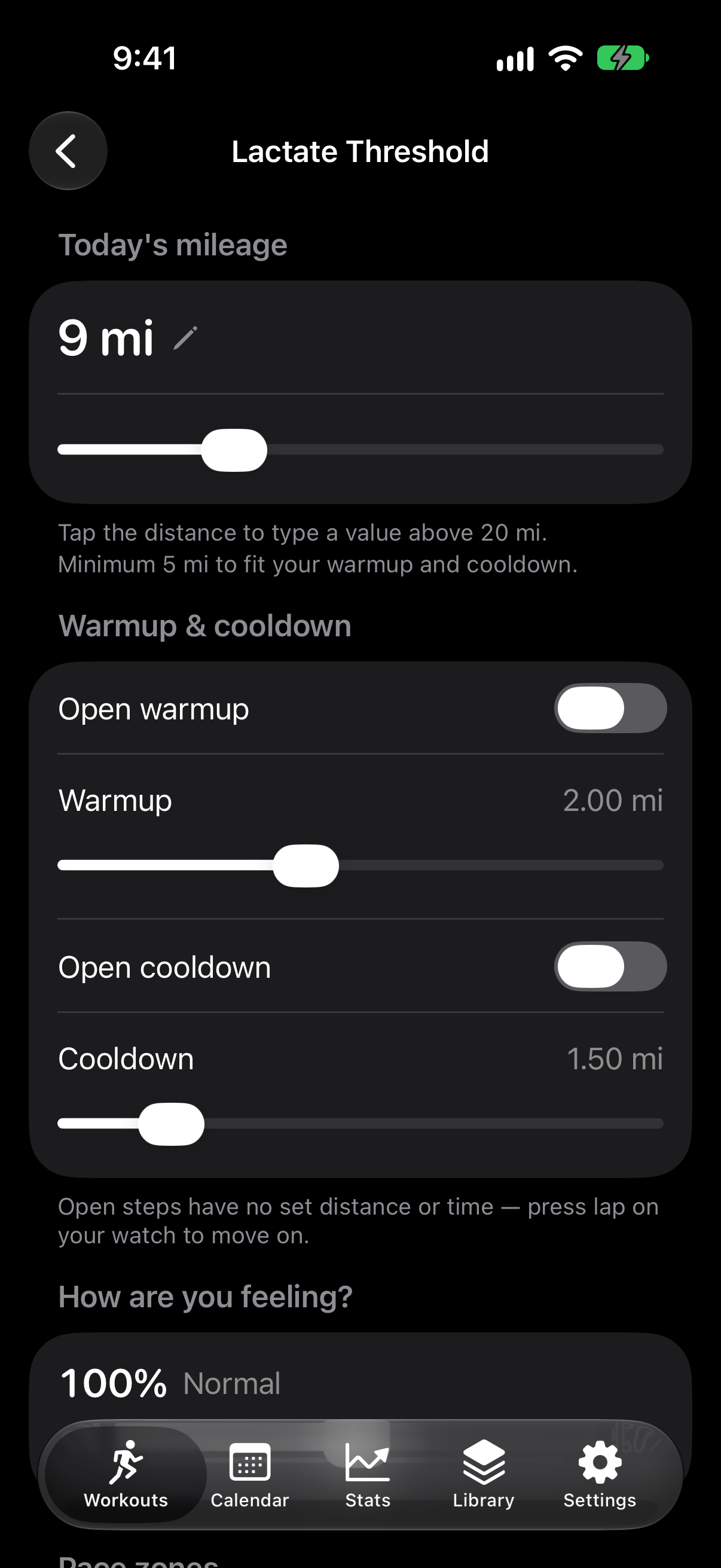
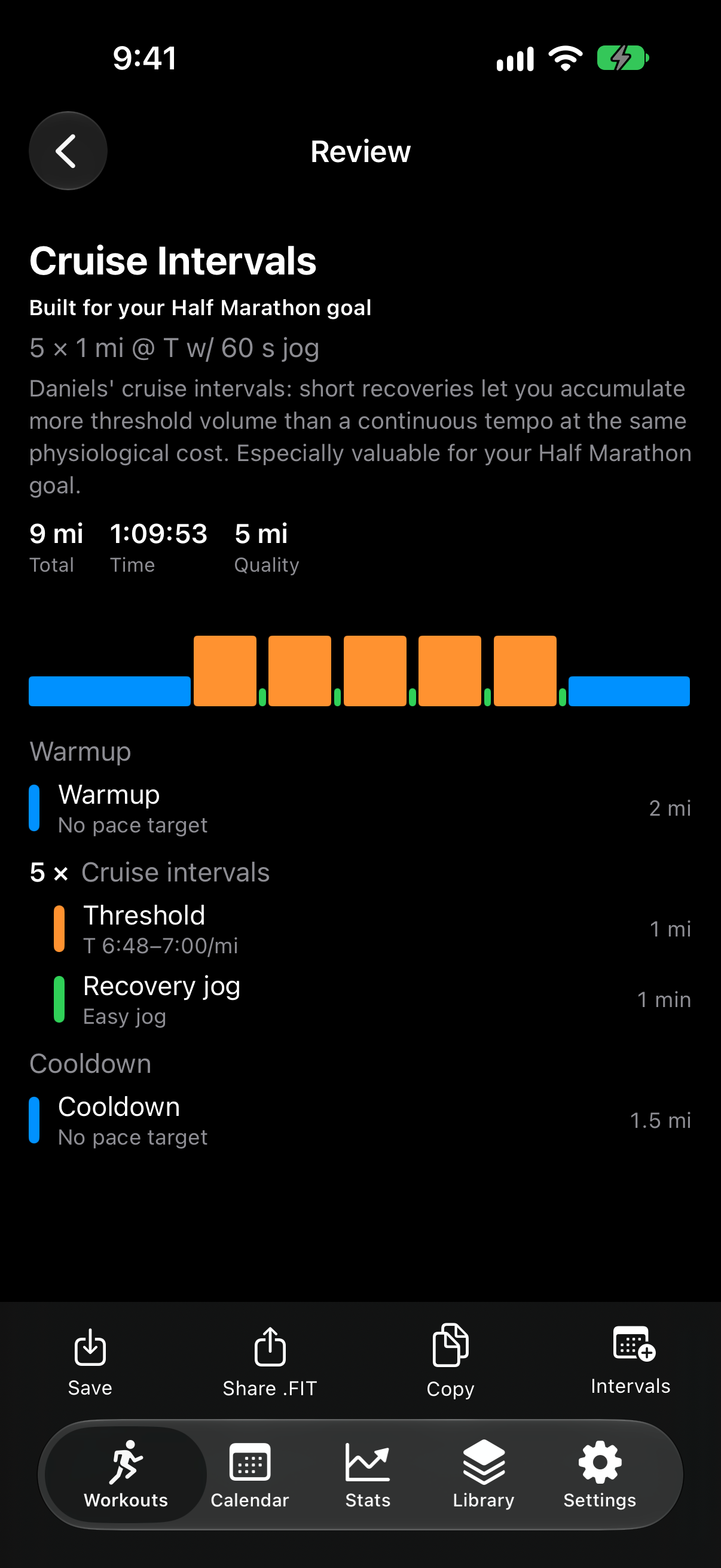
Eight categories
Each category offers two to five session templates. A goal race of Mile, 5K, 10K, half or marathon reshapes the options and hides sessions that don't suit it.
Training systems
The default. Eleven pace zones from easy to repetition, derived from your race result.
Zones relative to marathon pace, with threshold at 15K to half-marathon pace.
Easy at marathon pace plus 1–2 min per mile, strength at marathon pace minus 10 s.
Set your own range for any zone. Blank zones fall back to VDOT.
The intensity slider moves your VDOT 0.3 points per 1%, and every pace follows.
Beyond generating
Wearables & export
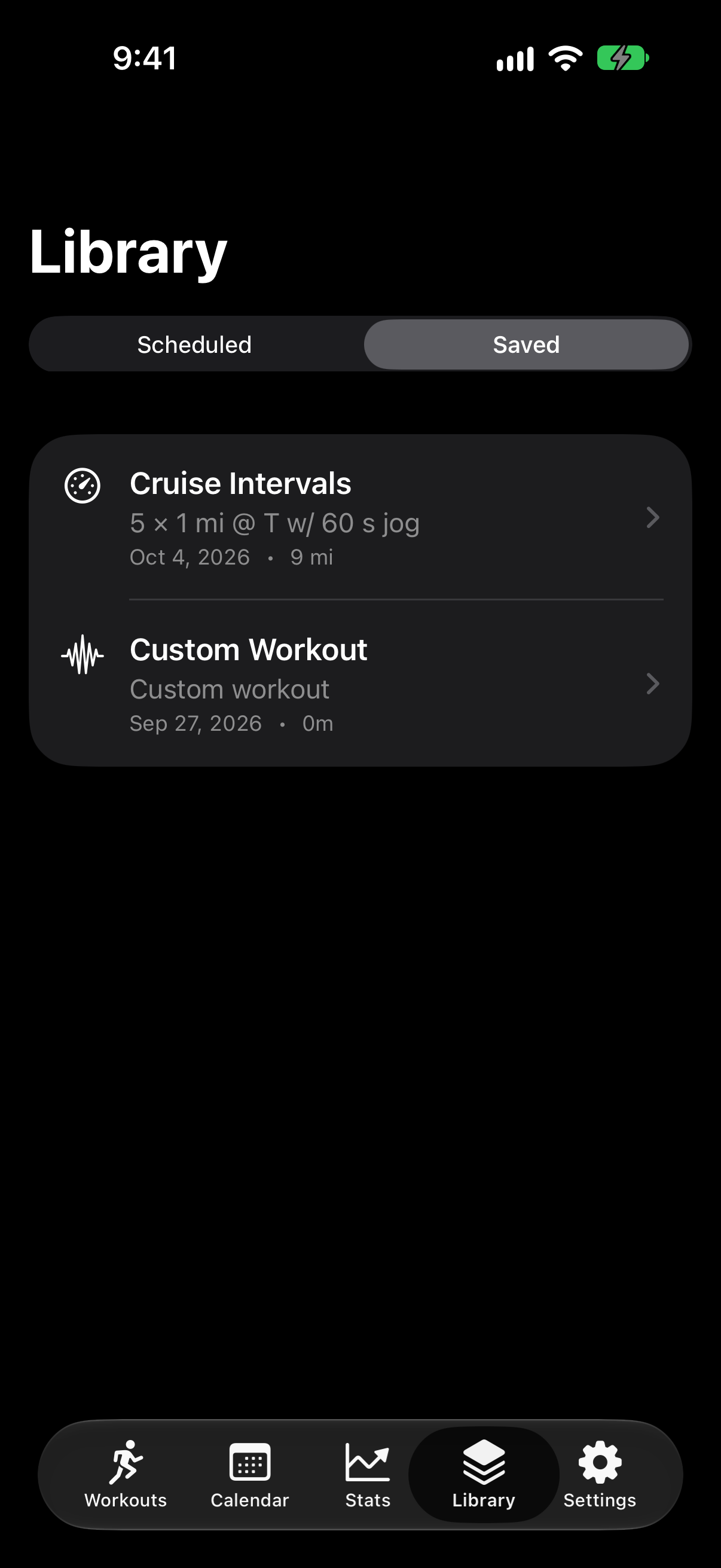
Save a .fit workout and share via Files or AirDrop, then copy it to your Garmin. No account needed.
Connect with your own API key. Workouts land on your calendar and sync on to Garmin Connect, if you've linked it there.
LapLimit is not affiliated with or endorsed by Garmin, Intervals.icu, or the authors of the training methods it references. See trademarks and credits.
Privacy policy
Effective October 21, 2026
LapLimit is a training app for runners and cyclists. This policy explains what personal data the LapLimit iPhone app and the laplimit.cc website handle, why, where it goes, how long it is kept, and the rights and choices you have. "LapLimit", "we" and "us" mean Fouad Omrane, the individual developer who makes and runs LapLimit.
Fouad Omrane, operating LapLimit, in Oregon, United States, is responsible for (the "controller" of) the personal data described in this policy. Contact: privacy@laplimit.cc.
Services you choose to connect, such as Intervals.icu, Garmin and Apple, are independent companies that decide for themselves how they use your data under their own privacy policies.
LapLimit encrypts your training data, schedule and activities on your device (AES-256), with a key kept in the iOS Keychain on this device only. Simple preferences, such as the strap name and the date you agreed to Garmin's notice, are kept in the app's own settings storage, protected by iOS. Your Intervals.icu API key or sign-in token and your Garmin Connect sign-in tokens are also kept in the iOS Keychain on this device only. They are never synced to iCloud Keychain and are never shown in the app. We have no access to any of this data.
When you start a workout with LapLimit's tracker, LapLimit asks for location permission and uses your precise location (GPS), including while the screen is locked, only during the workout, to measure distance, pace and your route. If you connect a Bluetooth heart-rate strap, LapLimit reads your heart rate during the workout. Spoken cues are generated on your iPhone.
The recording (time, distance, pace, GPS route and heart rate) is held on your iPhone only while you record. When you finish, it is saved to Apple Health if you allow it, and uploaded to your Intervals.icu account, including its GPS route and heart rate, if Intervals.icu is connected. LapLimit keeps no other copy, and nothing is sent to us.
Connecting Intervals.icu is optional. Intervals.icu is an independent service; LapLimit is not affiliated with or endorsed by it. Your Intervals.icu account and data are governed by the Intervals.icu Privacy Policy.
When connected, your iPhone talks directly to Intervals.icu over an encrypted (HTTPS) connection.
LapLimit reads:
LapLimit writes, only when you ask it to:
You can connect with your personal Intervals.icu API key or, where available, Sign in with Intervals.icu, where Intervals.icu shows exactly which permissions LapLimit is asking for. With sign-in, your iPhone exchanges the one-time code Intervals.icu returns for an access token directly with Intervals.icu. No LapLimit server is involved, and we never see the code or the token.
If you coach athletes, you are responsible for having their permission to view their data and plan their training in LapLimit, as you are in Intervals.icu.
Disconnecting removes the key or token from your iPhone, deletes the Intervals.icu data LapLimit downloaded, and revokes a sign-in with Intervals.icu. Your data in Intervals.icu itself is unaffected and is managed there.
Importing from Apple Health is optional. When you turn it on, LapLimit reads your workouts and their heart rate, distance, energy, power, cadence and route. It uses them only to show and analyze those workouts on your iPhone. LapLimit writes to Health only workouts you record with LapLimit's own tracker, when you allow it. If you also turn on uploading, new workouts recorded with the Apple Workout app are sent to your Intervals.icu account.
Data from Apple Health is never sent to us or to third parties other than Intervals.icu as described above, never used for advertising or marketing, and never stored in iCloud by LapLimit. Turning the import off removes the imported workouts from LapLimit. You can revoke access at any time in the Health app or in Settings › Privacy & Security › Health.
If you turn on sending planned workouts to Apple Watch, LapLimit uses Apple's WorkoutKit to schedule your planned Intervals.icu workouts in the Workout app on your watch, and removes them when you turn it off.
Garmin data can reach LapLimit in two optional ways: by connecting Garmin Connect in LapLimit, and through Intervals.icu. Garmin is an independent company; LapLimit is not affiliated with, sponsored by or endorsed by Garmin. Your Garmin account and data are governed by the Garmin Connect privacy notice.
Connecting Garmin Connect. You connect in Settings › Connections › Garmin Connect. Before anything is sent, LapLimit explains what it will send to Garmin and asks you to agree. You then sign in on Garmin's own page, where Garmin shows the permission LapLimit asks for and lets you turn it on or off. LapLimit never sees your Garmin password. LapLimit asks only for permission to import workouts into your Garmin Connect account.
What LapLimit sends to Garmin, only when you ask it to:
Garmin handles workouts you send under the Garmin Connect privacy notice, and may keep and use them even after you disconnect LapLimit. Don't send workouts to your Garmin Connect account if you aren't allowed to, for example under a rule from your employer, team or school.
What LapLimit receives from Garmin: sign-in tokens, the permission you granted, and Garmin's ids for workouts LapLimit sent. This connection does not give LapLimit your Garmin activities or health data.
LapLimit's sign-in server. Garmin requires the last step of signing in, and renewing access about once a day, to run on a server. Your iPhone sends Garmin's one-time sign-in code (or renewal token) over HTTPS to LapLimit's sign-in server at laplimit.cc, which runs on Cloudflare Workers. The server adds LapLimit's app credentials, forwards the request to Garmin and passes Garmin's answer straight back to your iPhone. It does not store or log the code or the tokens, and we never see them. Your IP address is used briefly to prevent abuse and is not stored.
Garmin activities through Intervals.icu. If you link Garmin Connect inside Intervals.icu, activities recorded on your Garmin device sync to Intervals.icu, and LapLimit downloads them from there like any other activity (see section 4). LapLimit shows the activity, its route map, charts and laps, and uses it with your other activities to calculate training load, fitness and form, VO₂max estimates and race predictions, all on your iPhone. As Garmin's API brand guidelines require, every screen showing a Garmin-recorded activity is labelled "Garmin [device model]", and totals, charts, predictions and insights calculated partly from Garmin data say so.
How Garmin data is protected. Garmin data is used only to provide these features to you. It is never sold, never shared with third parties other than as described in this policy, never used for advertising, and never sent on to Intervals.icu, Apple Health or anywhere else. No AI systems process Garmin data, and it is never used to train, test or improve AI models.
Workout files. A workout you export as a .FIT file (a format created by Garmin) contains only the planned workout LapLimit generated. It is saved or shared only where you choose.
Disconnecting in Settings › Connections tells Garmin to end LapLimit's access and deletes the tokens, workout ids and your agreement from your iPhone. You can also remove LapLimit or turn its permission off in your Garmin Connect account settings. Workouts already sent stay in Garmin Connect until you delete them there.
Garmin, Garmin Connect, Body Battery and the FIT format are trademarks of Garmin Ltd. or its subsidiaries.
This feature is not in LapLimit yet. This section tells you in advance how it is being designed. Before it is released, this policy will be updated with a new effective date, and LapLimit will ask for your permission in the app.
When available, you will be able to let LapLimit receive your Garmin activities, and later your Garmin health summaries such as heart rate variability, sleep, resting heart rate, stress and Body Battery™, directly from Garmin. Only data recorded after you connect is received.
Calendar. If you turn on Add scheduled workouts to Calendar, LapLimit asks for access to Calendar, creates a calendar named "Trainer" (the app's earlier name) and adds the workouts you schedule. LapLimit only changes events in its own calendar. When you turn the option off you can choose to remove those events.
Maps. Activity routes are drawn with Apple Maps. To show a map, your iPhone requests map imagery for that area from Apple, and Apple's Privacy Policy applies.
Weather. To show the conditions during an outdoor activity, your iPhone asks Apple Weather (WeatherKit) for the weather at the start of the route at the time of the workout. Apple's Privacy Policy applies, and weather data is provided by Apple Weather. If Apple Weather isn't available, LapLimit asks Open-Meteo, an independent weather service, instead. That request contains the route's start point rounded to about 1 km and the workout's dates, and no account or identifier. Nothing is sent to us.
The Race Day Pace calculator can fill in the forecast for a race. You pick a place, or tap Current location, which asks for location permission and reads your position (and its altitude) once. Your iPhone then requests that hour's forecast from Apple Weather. The location is used only for that request and is never stored or sent to us.
Running and cycling predictions on the Stats tab are calculated on your iPhone from your activities, planned events and power curves. They never leave the device.
The website. laplimit.cc is hosted on Cloudflare. It sets no cookies, uses no analytics, advertising or tracking, and loads no third-party scripts or fonts. To deliver and protect the site, Cloudflare processes technical data such as your IP address under the Cloudflare privacy policy. We don't turn on request logging.
Beta sign-up. If you request access to the beta, the website collects your email address and, only if you give them, your name, the watch you train with and your note, along with the date you agreed to be contacted. Your details are encrypted (AES-256) before they are stored in a database hosted by Cloudflare, and only we can decrypt them. Your IP address is used briefly to prevent abuse and is not stored. Your details are used only to send you beta invites and updates about the beta. They are deleted when the beta ends, when you ask, and in any case 12 months after you sign up. You must be 16 or older to sign up.
We use these providers, each only for the purpose described:
Intervals.icu and Garmin are not our service providers. They are services you choose to connect, and they act as independent controllers of the data in your accounts with them.
We use personal data only to provide the features you choose, keep them working and secure, and respond to you. Where the EU or UK GDPR or similar laws apply, our legal bases are:
LapLimit makes no automated decisions that have legal or similarly significant effects on you. Training load, VO₂max estimates and race predictions are estimates for your own training.
Workouts, heart rate, heart rate variability, sleep and similar data can be health data, and laws such as the EU GDPR, Washington's My Health My Data Act and Nevada's consumer health data law give it extra protection. LapLimit handles health data only on your iPhone, only with your permission, and only to provide the features you use. We never collect, sell or share it, except that it goes to services you connect (Intervals.icu, Apple Health, Garmin) when you ask LapLimit to send it there. In the planned Garmin activity import (section 7), our server relays it in encrypted form only, without being able to read it.
This section is our consumer health data privacy policy. You can exercise the rights in section 15 for health data too, including withdrawing consent and asking for deletion.
Wherever you live, you can ask us to:
We won't treat you differently for using these rights. Most of your data never reaches us and you control it directly in the app:
For anything else, including beta sign-ups, write to privacy@laplimit.cc. We may ask you to confirm you control the email address involved, and we will reply within 30 days, or sooner if the law requires. If we can't do what you ask, we'll explain why, and you can ask us to reconsider by replying to that email. You can also complain to your local data protection authority or, in the US, your state attorney general.
We protect personal data with encryption on your device (AES-256 with keys in the iOS Keychain), encrypted connections (HTTPS) for everything LapLimit sends, encryption of the beta sign-ups we store, and by keeping as little data on servers as possible. No method is perfectly secure. If a breach affecting your personal data happens, we will notify you and the authorities as the law requires.
We are based in the United States, and Cloudflare and Apple may process data in the United States and other countries. When personal data from the EU, UK or Switzerland is transferred, we rely on safeguards such as the European Commission's Standard Contractual Clauses or the EU-U.S. Data Privacy Framework, as used by those providers.
LapLimit is not directed at children under 13, and the beta is open only to people 16 or older. We don't knowingly collect personal data from children. If you believe a child has given us personal data, write to privacy@laplimit.cc and we will delete it.
We don't track you across websites or apps, so there is nothing for these signals to turn off. We honor them anyway.
Training load, form, VO₂max estimates and race predictions are estimates for general training guidance. They are not medical advice, and LapLimit is not a medical device.
If this policy changes, the new version will be published at the same address and in the app, with a new effective date. If a change is significant, we will say so on the website and in the app before it applies, and we will ask for your consent again where the law requires.
Questions or requests about your privacy: privacy@laplimit.cc
Terms & notices
Last updated: October 21, 2026
LapLimit is a training tool, not medical advice. Workouts and paces are calculated from the race result and settings you enter, and they are estimates. Running, especially hard interval and tempo work, carries a risk of injury. Talk to a doctor before starting or changing a training program, particularly if you have a health condition, are returning from injury, or are new to exercise. Stop if you feel pain, dizziness or unusual shortness of breath. You use the workouts at your own risk.
By using the app or this website you agree to these terms. The app and its content are provided "as is" and "as available", without warranties of any kind, including accuracy, fitness for a particular purpose or uninterrupted availability. To the fullest extent the law allows, LapLimit and its creator are not liable for any injury, loss or damage arising from your use of the app, its workouts or this website.
You are responsible for the accuracy of the data you enter and for how you use exported files and connected services. Using Intervals.icu, Garmin or any other third-party service is subject to that service's own terms, and you are responsible for your own account with it. We may update the app, the website or these terms at any time; the current version is always on this page.
The LapLimit name, icon, design and software are owned by their creator. You may not copy, resell or reverse engineer them except as the law allows. Workouts you generate are yours to use for your own training.
This section applies when you connect Garmin Connect™ to LapLimit, send workouts to it, or use data from Garmin devices in LapLimit. It adds to the terms above.
All product names, trademarks and works mentioned here belong to their respective owners and are used only to describe compatibility or training approaches. LapLimit is independent and is not affiliated with, sponsored by or endorsed by any of them.
Apple, iPhone, iOS, App Store, Apple Maps and AirDrop are trademarks of Apple Inc. Garmin and Garmin Connect are trademarks of Garmin Ltd. or its subsidiaries, and FIT is a Garmin file format. Intervals.icu is a service of its respective owner. VDOT and Daniels' Running Formula are the work and marks of Dr. Jack Daniels and the respective rights holders. Advanced Marathoning is by Pete Pfitzinger and Scott Douglas, published by Human Kinetics. Hansons Marathon Method is by Luke Humphrey and Hansons Coaching Services. Yasso 800s are credited to Bart Yasso. The 30/30 interval format is credited to Dr. Véronique Billat. Training paces and sessions in LapLimit are its own calculations and are not official output from any of these sources.
Placeholder background photography is from Wikimedia Commons, public domain.
Write to hello@laplimit.cc.
Beta
Request an invite to the LapLimit beta for iPhone. We'll email you when there's a spot.
Questions, feedback or bug reports are welcome.
LapLimit is a training tool, not medical advice. Consult a doctor before starting a training program. All third-party names are trademarks of their owners; see credits.